All
free, of course. Just do a web search by font name, and you'll find them!
Saturday, May 6, 2017
Fonts Etc
We're
always on the lookout for unique fonts for use in website design. Here's a few
of our latest acquisitions:
Tuesday, October 20, 2015
Wednesday, March 19, 2014
70s Fonts
We
recently had the opportunity to create a book cover (and related web site design) for a traditional gothic fiction novel entitled Glinhaven. While the
book is not scheduled for release until summertime, we’d like to share some of the
bold and attractive fonts we picked over that were common during the 1970s.
In
plain English, the pictured fonts include American
Purpose, Avant Garde, Cooper Black, Futura, Kompakt, KTF Roadstar, Souvenir and Spicy Rice.
Thursday, January 23, 2014
Newsers & Buttons
Our
latest newsletter design to highlight the release of Arabic Cookery from Food Fare:
Topic-specific
newsletters are often easier to put together because they focus on one
particular subject.
We
also created a button for Middle Eastern recipes based on the Arab League logo:
For
more logos and buttons from Webs Divine, click here.
Browser Hijackers
Last
month, one of our clients was complaining about links on a newsletter design we
had just uploaded for her preview. Her message went something like this:
I'm seeing some weird links in the newsletter
that shouldn't be there. Certain words - like "email" and "best
healthcare" - are linked, and they lead to strange places. The words
should be text only. Wonder why this is happening?
According
to Bot Crawl, random links appearing on web pages are caused by adware or
malware which is also known as "Text Enhance." It is a form of
bundled flash adware (categorized as a "browser hijacker") that
attaches to internet browsers without user consent. In other words, computers
are infected with an adware virus that prompts certain text on web pages to
show as links when they aren't meant to be linked. The web sites themselves are
not infected, but the computer or browser is.
More
from Bot Crawl:
Victims of the virus usually notice they have
been attacked by Text Enhance when web pages have links or hover links with spam
advertisements and information in a pop up window. These are called
"in-text advertisements." The owners behind Text Enhance generate
income by providing advertisement services (adware platform) to cyber criminals
and unethical third parties, as well as compromising and possibly selling
personal information. Note: Text Enhance does not infect web sites, Text
Enhance infects individual users. If you see text advertisements on a web site
then you are infected, not the web site.
Click here for steps to get rid of the virus (look near the bottom of the page), or
use the following instructions for Internet Explorer via Bot Crawl:
How To
Remove Text Enhance
(And Third-Party Malware)
Microsoft
Internet Explorer:
Step 1: Clear browser cache load and cookies.
Step 2: Click the "Tools" button
and then click "Manage add-ons."
Step 3: Under SHOW, click "All
add-ons" or "Toolbars & Extensions" (depending on which version of IE you use).
Step 4: Select the Text Enhance plug-in from
the list of software, and click disable. Possible
Extension Names: Bandicam, BCool,
Better Links, Bflix1.0, Browser Enhancements 1.0, Click 2 Save, Codec-V,
CodecC, CodecC 1.0, CodecM, Codecv 1.0, Coupon Companion, Crossrider Web Apps,
Deal Spy, Dealply, Deals Plugin, Downloadnsave, Facebook Dislike Button
(extension, not actual button or link), Facetheme, Fantapper, Fast save,
Flashblock, Freemind, Game Play Labs, Greasemonkey, Ilivid, I Want That, I Want
This, Iminent, Installed Class, With Java plug-ins, Jlmp3, Media Plugin,
Notepad, OneTab, Pando Media Enhancer, Premiumplay Codec, Privacy SafeGuard, Privacy
SafeGuard 1.1, Protector by IB2.0.0.412, Rewardsarcade, RewardsArcadeSuite,
SearchEnhance, Shockwave, SiteAdvisor, Splashtop Inc, SportHunter TV App,
Startnow Toolbar, TheBflix, TheBflix5.0, TheBflix Class, Toad, Vid-Saver, Video
File Download, Vuze, VMWare Player, Widgi Toolbar Platform, wxDfast,
Xtendmedia, Yontoo, YouTube Plus and ZoomEx.
How to
block the Text Enhance cookie: From the "Tools" menu of Internet
Explorer, select Internet Options; select the PRIVACY tab and then click SITES.
The "Per site privacy actions" window will be displayed. In the Per
site privacy actions window, enter Text-Enhance.com in the address of web site
field. Click BLOCK.
Restricted
site option: Access:
Tools(Alt-x) > Internet Options; select the SECURITY tab and click RESTRICTED
sites. Click the "Sites" button and individually enter: Text-Enhance.com and Textsrv.com.
For
more browser options, go to Bot Crawl.
Online
advertisements are bad enough, but when you have malware forcing you to
unwanted sites it is more than infuriating. It's especially frustrating when
you spend a great deal of time designing and putting together an ad-free web
page only to have adware hi-jinks forcing viewers to places they don't want to
go. It also makes users and clients question the designer as if they are adding
the links on purpose. Thankfully, our client fully understood what was
happening once we explained it to her and did not hold us responsible.
Friday, August 16, 2013
Book Covers
Our
latest e-book cover design:
Basque Flavors was a re-do of the original cover. We like the new one better,
naturally!
The
new book cover for Basque Flavors was designed around the "Bayonne:
Arrivee des Marchandes de Sardines" woodblock print painted by Edouard
Pingret (1788-1875). The original is currently on display at the Fonds Ancely,
City Library of Toulouse (Bibliotheque
Municipale de Toulouse). A photograph
of the print was edited by Webs Divine to create the book cover template. The
original artwork is in the public domain as it was published before January 1,
1923 and because the copyright term is the author's life plus 100 years or
less. The work has been identified as being free of known restrictions under
copyright law, including all related and neighboring rights.
Visit
our Book Cover Design page for more.
Thursday, August 15, 2013
Logo Button Frenzy
Lots
of new logos designed in the last few months… all for Food Fare's recipe pages.
Visit
our Logos & Buttons page for more.
Wednesday, July 3, 2013
Saturday, April 20, 2013
Logo Goodies
Our
newest logos and buttons, both of which were designed for author Deborah O'Toole:
Graphic
logo advertising the fiction novel Celtic Remnants (soldier and flag imagery
based on a photograph from archives on the Irish Republican News web site):
Button
created for a recent promo for the fiction novel Mind Sweeper:
Visit
our Logos & Buttons page for more.
Tuesday, March 26, 2013
Testing Tool
Good
tester…
Google
has a free service to test safe browsing by url. You can also check to see if
your own web pages are infected by malware. Earlier, we tested a web page
tagged as malware by Twitter which we knew was an error because we created the
web page without such nonsense.
To
test pages, replace url with your own web address following site=prompt
as displayed below.
http://www.google.com/safebrowsing/diagnostic?site=http://shenanchie.tripod.com/FoodFare/scotland.htm
Very
useful tool…
Monday, February 25, 2013
Newbie Web
Our
newest client is Kate Jansky, who recently announced her candidacy for the American Association of Nurse Anesthetists (AANA) Director for Region 5.
The
design is rather simple but elegant with blue, brown and cream accents. We also
used hovering images for the main navigation menu, which change from dark blue
to white.
The
personalized contact form was created using Coffee Cup's Web Form Builder. We
love the program, and just about any software Coffee Cup has to offer. Their
customer service is excellent as well.
Document Services Et Al
Webs
Divine also offers document services, such as personalized greetings with
images. The greetings typically come in PDF format.
For
more about our document services, click here.
Friday, January 11, 2013
Foggy Header
We
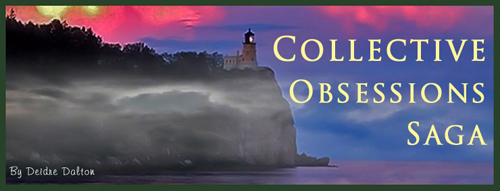
designed a new header for the Collective Obsessions Saga last week:
Kudos
to Smart Photo Editor for the community-contributed "fog" effect. It overlaid
perfectly just underneath the cliff and lighthouse, which depicts the essence
in the series of books written by Deidre Dalton.
Monday, December 24, 2012
Access Management Et Al
December
has been a busy month for us, aside from personal holiday preparations. All of
us at Webs Divine are looking forward to a purposely quiet New Years Eve celebration
to recharge our collective batteries, and then it's back to work.
In
early December, we created an access management system for one of our existing clients.
It was a first go-around for us, but from start to finish it took about six
days to complete the project. The Members Only feature of the project included
organizing and tracking more than six hundred user names and passwords, which
gives access to confidential documents and web pages.
To
that end, we utilized Coffee Cup's easy-to-use Website Access Manager. The
software program was indeed a blessing, and comes highly recommended by us.
Product
description:
"When it comes to
password-protecting members-only areas of your web site, .htaccess files are
the way to go. Unfortunately, they are also complicated. Website Access Manager
gives you all the power of .htaccess files with none of the confusion. Its
workspace is easy to use, setting up members-only areas is fast, and you can
protect as many pages as you want."
Coffee
Cup's customer service department is a cut above the rest as well. Whatever
questions we had were quickly addressed by a member of their staff.
Website Access
Manager (WAM) tips:
- Because the .htaccess function only works with Apache and Apache-compatible servers, WAM comes with a tool to determine if your server meets the requirements. Your server should have PHP 4.47 or higher installed in order to use WAM.
- Before importing an Excel spreadsheet for correct use in WAM, the spreadsheet has to contain information placed in a certain order. The various lettered columns signify specific information fields in WAM, so the data must be provided accurately in order for the spreadsheet to import properly. For example, column A must contain the user's real name, column C their preferred user name, column D password and column F an e-mail address. The reason columns B and E are skipped is so that when information is imported it goes to the correct fields for the individual member. For example, if we added information to columns B and E, the data listed would go to the wrong fields once imported into WAM. For a list of all correct property fields, click here.
- If you are using an Excel spreadsheet to create a database in WAM, the document must be saved as a comma-delimited file (CSV).
- After importing an Excel spreadsheet into WAM, all user details should be in their proper fields. However, if user details change in the future (new address, new member, delete member, etc.), the fields can be edited inside the WAM program (as opposed to importing the Excel spreadsheet all over again).
As
we went along creating our access management project earlier this month, we also
put together a personalized step-by-step "user's manual" for our client. This
is something we do for clients on request. Call it a back-up plan just in case
the client has to take over maintenance of a site for one reason or another. In
other words, we don’t like to leave folks twisting in the wind in case the
unthinkable happens.
Apart
from creating the new access management system, we were busy in December with
two quarterly online newsletters (IENA and WANA), along with several book cover designs, logos and buttons.
We
also acquired a new client in December, but must remain mum about their
identity for the time being. The client will be running for a political office
in February and wants a web presence established before he/she begins their
campaign.
Excel/WAM Guide
Before
importing an Excel spreadsheet (CSV) for correct use in Coffee Cup’s Website Access Manager (WAM), the spreadsheet has to contain information placed in a certain
order. The various lettered columns signify specific information fields in WAM,
so the data must be provided accurately in order for the spreadsheet to import
properly. The list below displays the guideline:
A)
Real Name
B)
Title
C)
Username
D)
Password
E)
Website
F)
E-Mail
G)
Company Name
H)
Address 1
I)
Address 2
J)
City
K)
State
L)
Zip
M) Country
N)
Phone
O)
Fax
P)
Language
Q)
Time Zone
R)
Note
S)
Expiration Date (uses local system date format)
Leave
the lettered column blank if the information is not needed, but do not place
incorrect information in blank column or it will throw off the placement when
imported into WAM.
Click here for more
information, or click here to return to "Access Management Et Al" blog entry.
Wednesday, November 21, 2012
Holiday Buttons
We have lots of fun creating holiday-themed logos and buttons. This
is our latest:
The button will be used for the Christmas recipes at Food Fare next week.
To view more, go to the Logos & Buttons page of our web site.
The button will be used for the Christmas recipes at Food Fare next week.
To view more, go to the Logos & Buttons page of our web site.
Tuesday, October 16, 2012
No-Repeat Web Background
Adding a tiled image as a web background can sometimes cause a
continuous repeat of the image, making the page look confusing and
unprofessional. A simple code can fix the issue.
The above image is named "scrollcandle.jpg." In order to stop the background image repeat, use the following CSS code (placing the name of your image in the brackets following url):
<style type="text/css">body{ background: url(scrollcandle.jpg) black center no-repeat fixed; } </style>
Using the code will allow the background image to display as follows:
The properties of the code can also be adjusted to fit the background of your web page. For example, "black center" can be changed to color and alignment suited to your needs.
Click here to see a live sample of a no-repeat web background.
The above image is named "scrollcandle.jpg." In order to stop the background image repeat, use the following CSS code (placing the name of your image in the brackets following url):
<style type="text/css">body{ background: url(scrollcandle.jpg) black center no-repeat fixed; } </style>
Using the code will allow the background image to display as follows:
The properties of the code can also be adjusted to fit the background of your web page. For example, "black center" can be changed to color and alignment suited to your needs.
Click here to see a live sample of a no-repeat web background.
Wednesday, September 19, 2012
Historical Logo
Creating personalized logos and buttons can sometimes be a challenge,
but they are also great fun.
Historical Essays
is our latest:
The intent was to create an "antique" feel to the logo to accurately depict the advertised content. Each essay in the five-book collection reached back into history to include Jack the Ripper, US Political Parties, Billy the Kid, Anne Boleyn and the Loch Ness Monster (for which we also designed the book covers).
For the logo we began with a black slate, inserted the essay covers in a row and then saved it as one new image. After applying various backgrounds (glow, saturate, grungy and parchment), the above image became the final logo.
The border style of the logo is known as "wizard's book," which can be found within the Smart Photo Editor software program.
The intent was to create an "antique" feel to the logo to accurately depict the advertised content. Each essay in the five-book collection reached back into history to include Jack the Ripper, US Political Parties, Billy the Kid, Anne Boleyn and the Loch Ness Monster (for which we also designed the book covers).
For the logo we began with a black slate, inserted the essay covers in a row and then saved it as one new image. After applying various backgrounds (glow, saturate, grungy and parchment), the above image became the final logo.
The border style of the logo is known as "wizard's book," which can be found within the Smart Photo Editor software program.
Friday, August 17, 2012
Quick Forward
Forwarding pages are often used to re-direct people to a specific web
page that has moved or for one reason or another, has been renamed.
We recently designed a forwarding page for a new client. She wanted the page to forward automatically, so we devised the following:
The snippet used to forward a page needs to be placed between the <head> and </head> portion of the html code:
It's as simple as that!
We recently designed a forwarding page for a new client. She wanted the page to forward automatically, so we devised the following:
The snippet used to forward a page needs to be placed between the <head> and </head> portion of the html code:
<meta http-equiv="Refresh" content="5;url=https://www.advocare.com/110918645/default.aspx">In the above code, 5 represents the number of seconds before the page forwards. You can change this to any length of time you prefer, such as 3 (for three seconds). The url (also bolded above) needs to be replaced with the exact web address of where you want the page forwarded.
It's as simple as that!
Wednesday, August 1, 2012
Rainee's Parade Photo Gallery
We recently completed a new photo gallery for the pet-related web
site
Rainee's Parade. A logo for the gallery comes as part of the
package.
Constructing flash photo galleries is one of our specialties, and we love nothing more than creating special galleries for beloved pets as well as people and products.
Subscribe to:
Posts (Atom)